Functional domains
A functional domain groups the frontends and services of one business capability, for example Payments or Catalog: the screens and the backends that call each other. A frontend or a service belongs to one domain at most, and can belong to none.
A domain is what you hand to the AI to change a whole capability in one request, what you deploy on its own without touching the rest of the project, and what you can limit a member to.
The domains of a project
Open Domains in the sidebar (/domains). The page header has a view switcher, Deployed
versions and New domain. An empty project shows No functional domains with a New domain
button instead.
Galaxy view
The default view is a map of the project: every domain is a galaxy, and its frontends and services are the stars.
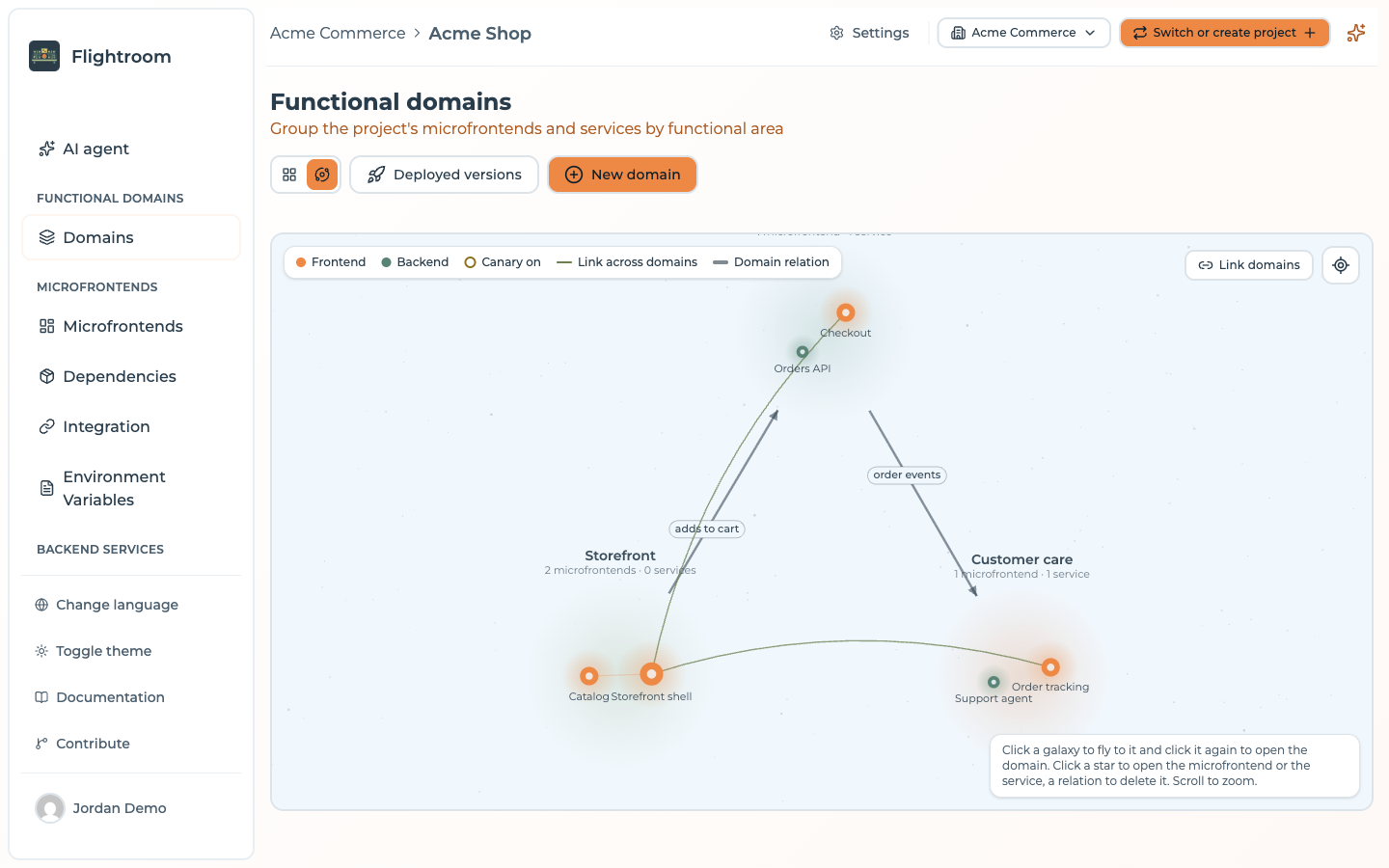
- Click a galaxy to fly to it, and click it again to open the domain.
- Click a star to open the frontend or the service.
- Scroll to zoom; Show everything zooms back out to the whole project.
- The legend tells apart the stars with a canary on (Canary on), the links between frontends or services of two different domains (Link across domains), and the relations you drew between domains (Domain relation).
To relate two domains, press Link domains, click the galaxy the relation starts from, then the one it goes to (Esc cancels). The New domain relation dialog takes an optional Label, such as uses or publishes events to. A relation goes one way: a relation back is a relation of its own. Click a relation to delete it; the domains and their members stay.
Cards view
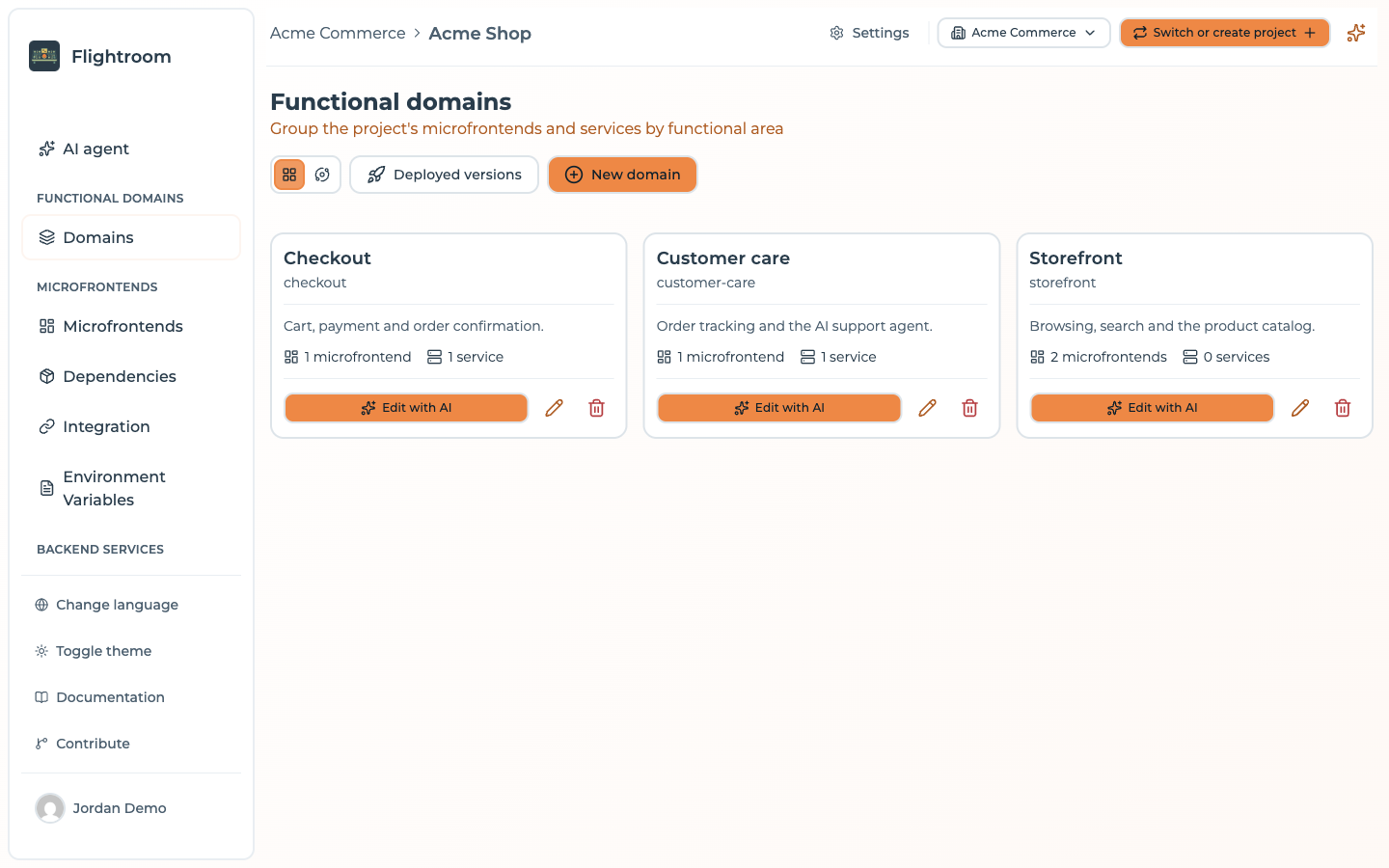
One card per domain, with its name, slug, description and the number of frontends and services. Each card has:
- Edit with AI, which opens the domain;
- the pencil, to edit its Name, Description and AI context;
- the trash icon, to delete it. Its frontends and services stay, without a domain, and its relations are deleted with it.
Creating a domain
New domain asks for a Name (required, and unique in the project), a Description and an AI context: notes for the AI agents about this domain only, in Markdown, up to 20,000 characters. What applies to the whole project belongs in the project context, in Settings.
Deployed versions
Deployed versions opens /domains/deployments, a matrix of which version of each frontend
and service runs in each environment:
- Rows are the domains, then No domain for the frontends and services in none (shown only when there are some).
- Columns are the environments, in their order, each with its colour, a Production badge where it applies, and the deployment it serves with its date, or Never deployed.
- Each cell lists the members of the domain as
slug version.
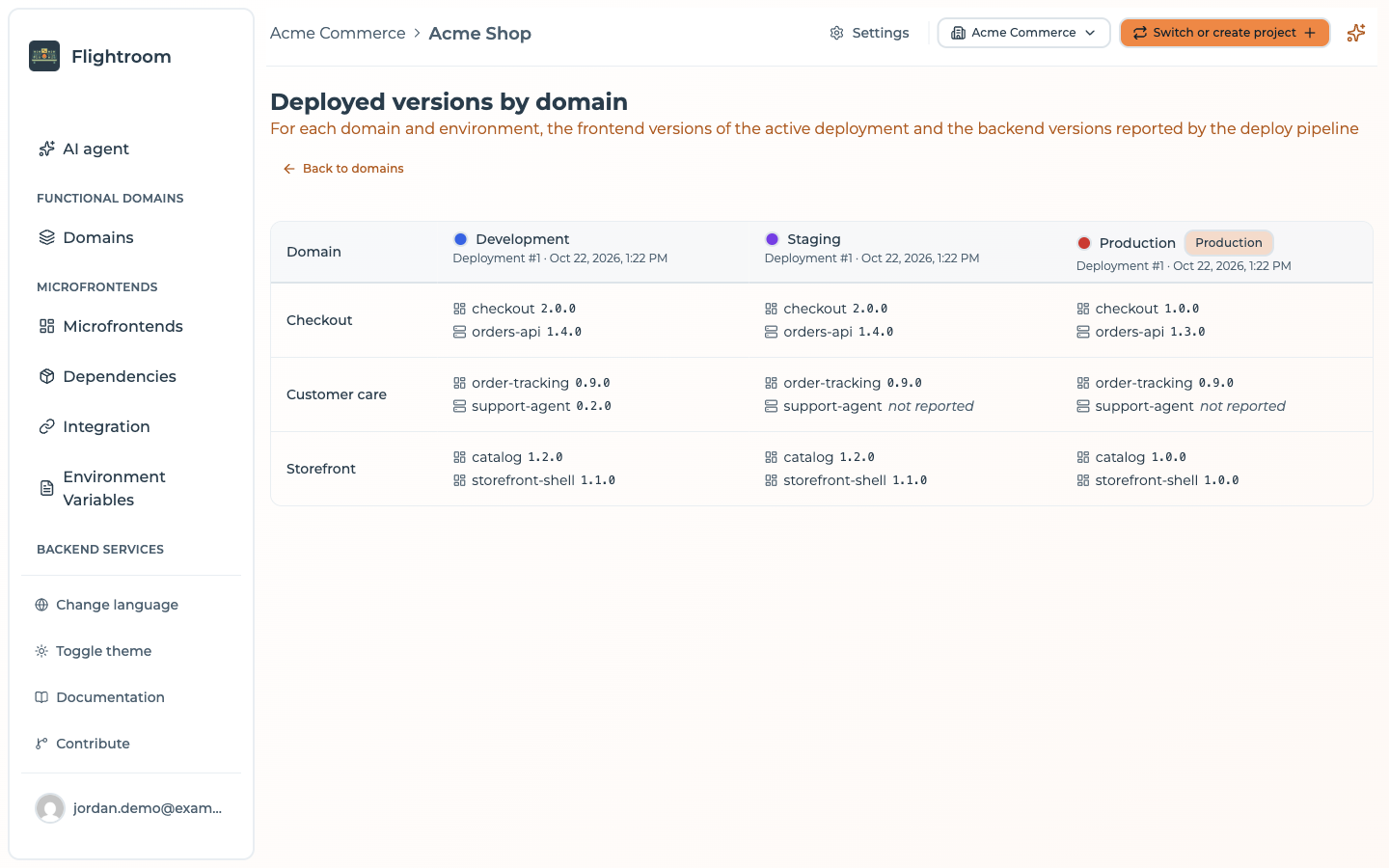
Where the versions come from is not the same for the two halves:
| Member | Version shown | When there is none |
|---|---|---|
| Frontend of kind Bundle | The one in the deployment the environment serves (the active one), with its canary if one is on, for example 1.2.0 · canary 1.3.0 (10%) | not deployed |
| Frontend of kind Docker | The latest version its deploy pipeline reported for that environment, through POST /api/frontends/by-slug/:slug/environments/:environmentSlug/deployments | not deployed |
| Service | The latest version a deploy pipeline reported for that environment, through POST /api/services/by-slug/:serviceSlug/environments/:environmentSlug/deployments | not reported |
The backend versions come only from that call. A Deploy through GitOps does not write it, so a project that deploys its services with GitOps and nothing else shows not reported in every backend cell. Add the call to your deploy pipeline: see Reporting where a version runs.
The same information, for one domain, is on the Overview of its structure (below).
A domain's page
A domain has two tabs, Edit with AI and Structure, and a Deploy button on both.
Edit with AI
/domain/:id (also /domain/:id/ai) is where you ask the AI for a change across the whole domain: one
agent works on every frontend and service of the domain that has a code repository, at most 10,
and proposes one change per repository. See
Change a whole domain.
The tab is always there. Without an AI it reads AI editing is not available in this project: the organization has no AI it can use. A domain with no member, or none with a repository, is handled by Generate a domain, which creates them first.
Structure
/domain/:id/structure shows the members of the domain, split into Frontend (its frontends)
and Backend (its services), in four views:
| View | Shows |
|---|---|
| Diagram view (the default) | Frontend and backend on one canvas. Drag from a frontend's dot to another frontend or to a service to link them; drop the link on empty canvas to create a new frontend under it. Select a link and press Delete to remove it, double-click a block to open it. Positions are shared with the Frontends page |
| Overview | Two cards listing the members with their version, and the Deployed versions of the domain per environment |
| Grid view | The members as cards |
| Table view | The members as a table |
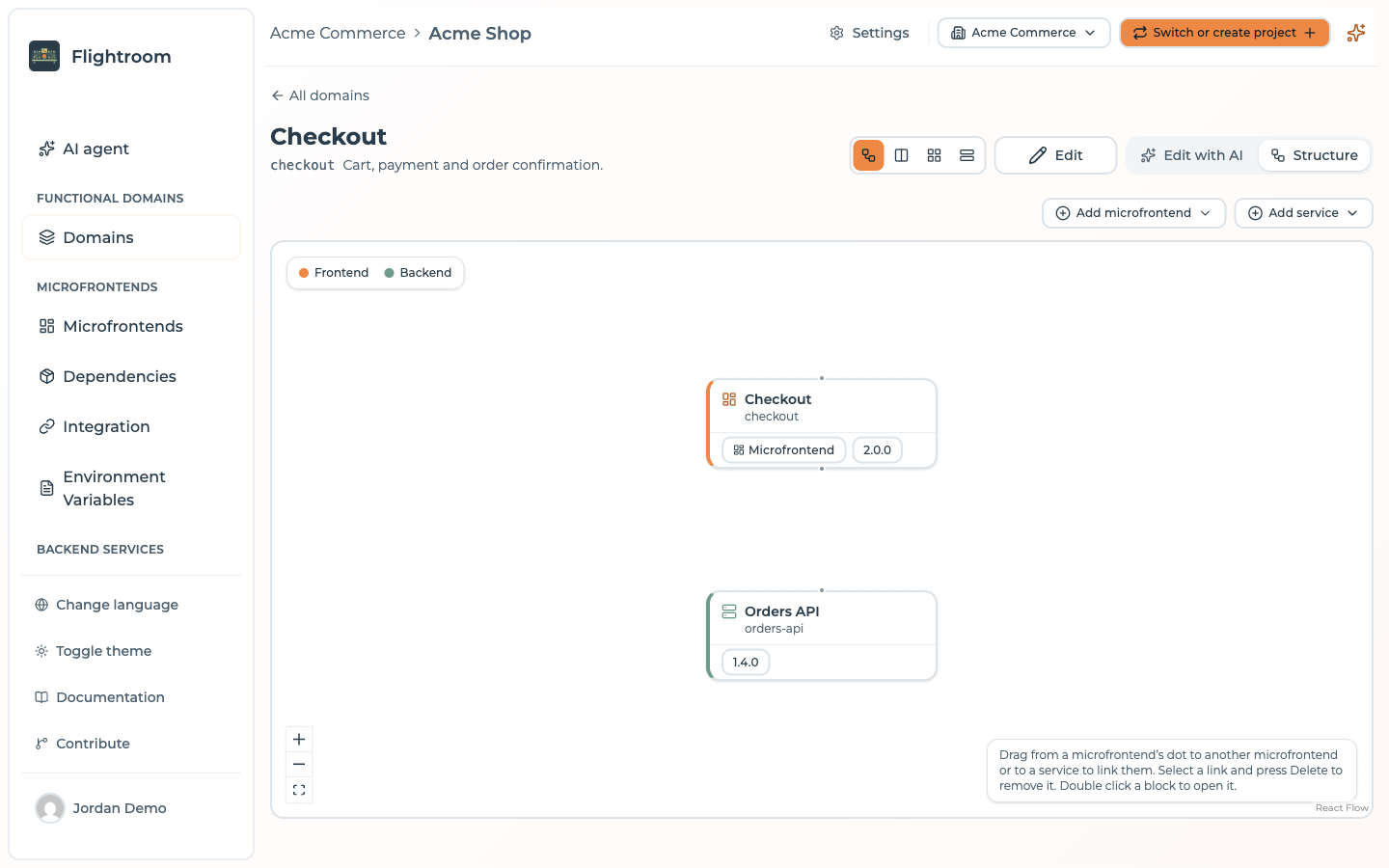
Edit in the header changes the name, description and AI context of the domain.
Adding frontends and services
Add frontend and Add service open the same menu:
| Entry | What it does |
|---|---|
| Create a new frontend / Create a new service | Opens the creation form with the domain already set |
| Add existing | Picks frontends or services of the project to put in this domain. Those in another domain are moved here |
| Import from repository | Creates one frontend or one service per repository of a code repository connection, in this domain. Shown only when the project has a connection. See Import repositories |
Deploying a domain
Deploy opens Deploy domain: pick the environment and press Deploy. Only the frontends and services of this domain are deployed; the other domains keep the versions the environment serves now. Config maps and secrets are still deployed as they are now. The button is hidden while the project has no environment. See Deployments and Deploy to Kubernetes.
Members limited to some domains
A project member can be given access to the Whole project or to Specific domains only (see Changing a role). A member limited to some domains:
- sees only those domains, their frontends and services, and the relations between two of them. The No domain row of the matrix never shows for them;
- cannot create, edit or delete domains, relate them, or move members into them;
- sees and starts only the AI jobs on their domains. See Guardrails.