Frontend hosting options
Every frontend declares where its files live. This is the hosting type, set under
Hosting Information in the Hosting tab of the frontend form. It determines how
Flightroom resolves a request for remoteEntry.js into actual bytes.
There are three options. They apply to the Bundle kind only: a Docker frontend is served by its own Docker container and has a Container tab in place of Hosting — see Bundle or Docker.
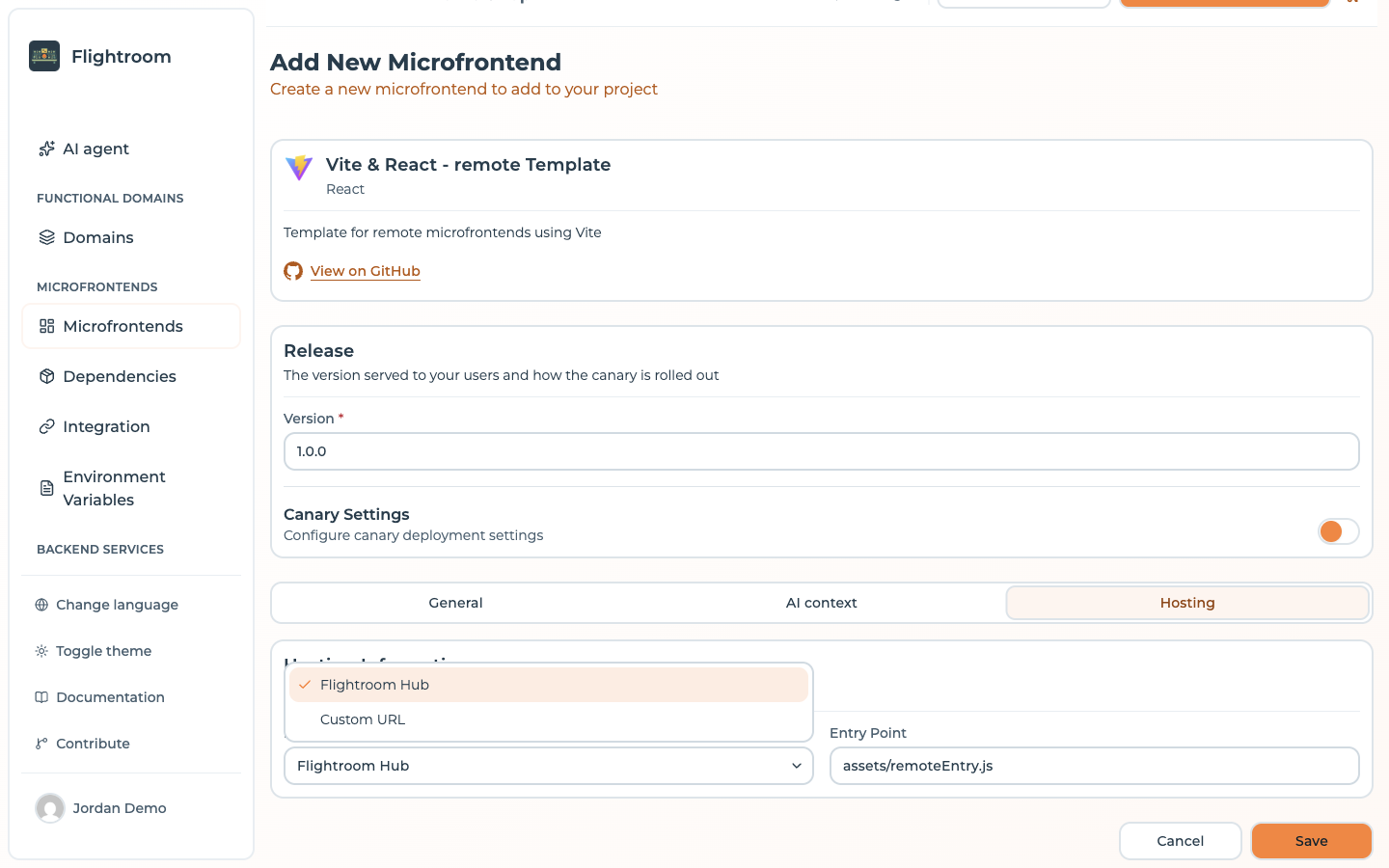
Custom Source only appears in the list once the project has at least one storage configured.
Flightroom Hub
The platform stores the build itself. You upload a ZIP of your dist folder and MFE
Orchestrator extracts and serves it.
- Best for: getting started, internal tools, self-hosted installations where you already own the disk.
- Where files land: on the server filesystem, under
<MICROFRONTEND_HOST_FOLDER>/<projectSlug>-<projectId>/<frontendSlug>/<version>/.MICROFRONTEND_HOST_FOLDERdefaults to/upload-microfrontends— see Environment Variables. - Upload with: the upload endpoint, used by the generated pipelines.
When self-hosting, mount MICROFRONTEND_HOST_FOLDER on a persistent volume. In the reference
docker-compose.yaml this is the upload_microfrontends volume. Without it, every container
restart loses your uploaded builds.
Custom Source (your own bucket)
The platform stores the build in an object storage bucket you own — Amazon S3, Azure Blob Storage or Google Cloud Storage — and streams files from there on request.
- Best for: production, compliance requirements, keeping artifacts inside your own cloud account.
- Requires: a configured storage, selected on the frontend.
- Where files land: inside the bucket, under
<storage path>/<projectSlug>-<projectId>/<frontendSlug>/<version>/. The optional storage-levelpathlets several projects share one bucket without colliding. - Upload with: the same upload endpoint — the platform routes the artifact to your bucket for you.
Your bucket does not need to be public. Files are fetched server-side with the credentials you configured and streamed to the browser through the serve API.
Custom URL
The files are already published somewhere — a CDN, an existing static host, another team's infrastructure — and you just want Flightroom to keep track of versions and hand the right URL to your host application.
- Best for: frontends you do not build, or an existing CDN setup you do not want to change.
- Requires: the URL of the entry file.
- Upload: not supported. Uploading to a Custom URL frontend is rejected; publishing is entirely your responsibility.
The URL and its placeholder
The URL is the address of the entry file itself, not a base folder: it is handed to your host as it is, and the Entry Point field is not appended to it. It may contain one placeholder, substituted when the URL is handed out:
| Placeholder | Replaced with |
|---|---|
$version | The version this caller resolves to: the version of the active deployment, or the canary version for a caller drawn into a version-based canary |
For example:
https://cdn.example.com/mfe/catalog/$version/remoteEntry.js
Only the first $version in the URL is replaced. $microfrontendSlug, $projectId and
$projectSlug are not substituted in the URL handed to your host, so a URL using them reaches
the browser with the placeholder still in it: write the slug and the project into the URL
literally.
$version is what makes this option useful: switching a version in the console and deploying
is enough to point your users at different files on your CDN, with no rebuild of the host.
Choosing between them
| Hub | Custom Source | Custom URL | |
|---|---|---|---|
| Who stores the files | Flightroom | You (bucket) | You (anywhere) |
| Upload via API/CI | ✅ | ✅ | ❌ |
| Artifacts stay in your cloud | ❌ (unless self-hosted) | ✅ | ✅ |
| Setup effort | None | Bucket + credentials | Publish pipeline of your own |
| Version switching | ✅ | ✅ | ✅ (via $version) |
Entry point
For the Flightroom Hub and Custom Source, the Entry Point field names the file consumers load,
inside the uploaded build. The form pre-fills assets/remoteEntry.js, the Vite Module Federation
layout; a frontend created from a template gets the entry point that template declares instead.
Only when the field is left empty does the platform fall back to index.js. Check it against your
build output:
| Build setup | Typical entry point |
|---|---|
Vite + @originjs/vite-plugin-federation | assets/remoteEntry.js |
| Webpack Module Federation | remoteEntry.js |
| single-spa application (Vite library build) | index.js |
| micro-lc parcel (Vite UMD build) | parcel.js |
A frontend created from a template starts with the entry point the template declares in the marketplace, unless you typed a different one in the form before saving.
The entry point gets special cache treatment: it is always served with
Cache-Control: no-cache, no-store, must-revalidate, while the hashed assets around it are
cacheable. That is what allows a deployment to take effect immediately without stale chunks.
All served files also carry Cross-Origin-Resource-Policy: cross-origin, so a host on a
different origin can load them.